Driving a Spare Phone with Google's ARTEMIS, No Cable Required
Driving a Spare Phone with Google’s ARTEMIS, No Cable Required
I have a spare phone that sits in a drawer most of the time. It is a Xiaomi Redmi Note 10 Pro (el celular viejo que tenía guardado) and it charges slowly, the battery is not great anymore, and I never use it for anything. So when I read about ARTEMIS, Google’s autonomous mobile agent that drives a real Android device from natural language, my first thought was that this phone finally had a job.
My second thought was a problem. The README’s quick start says “Ensure an Android device (with USB Debugging enabled) or emulator is connected”, and I did not want that phone plugged into a cable forever in my homelab. I wanted it on a shelf, on Wi-Fi, doing things when I asked it to.
So the real question of the evening was not “can an AI agent use my phone”. It was “can it use my phone without a cable”, and if not, how much work would it take to get there. This post is the whole process, including the four things that broke, because I think the failures are more useful than the happy path. If you just want the answer: yes, it works, and none of it required touching Google’s code except one small patch I will show you.
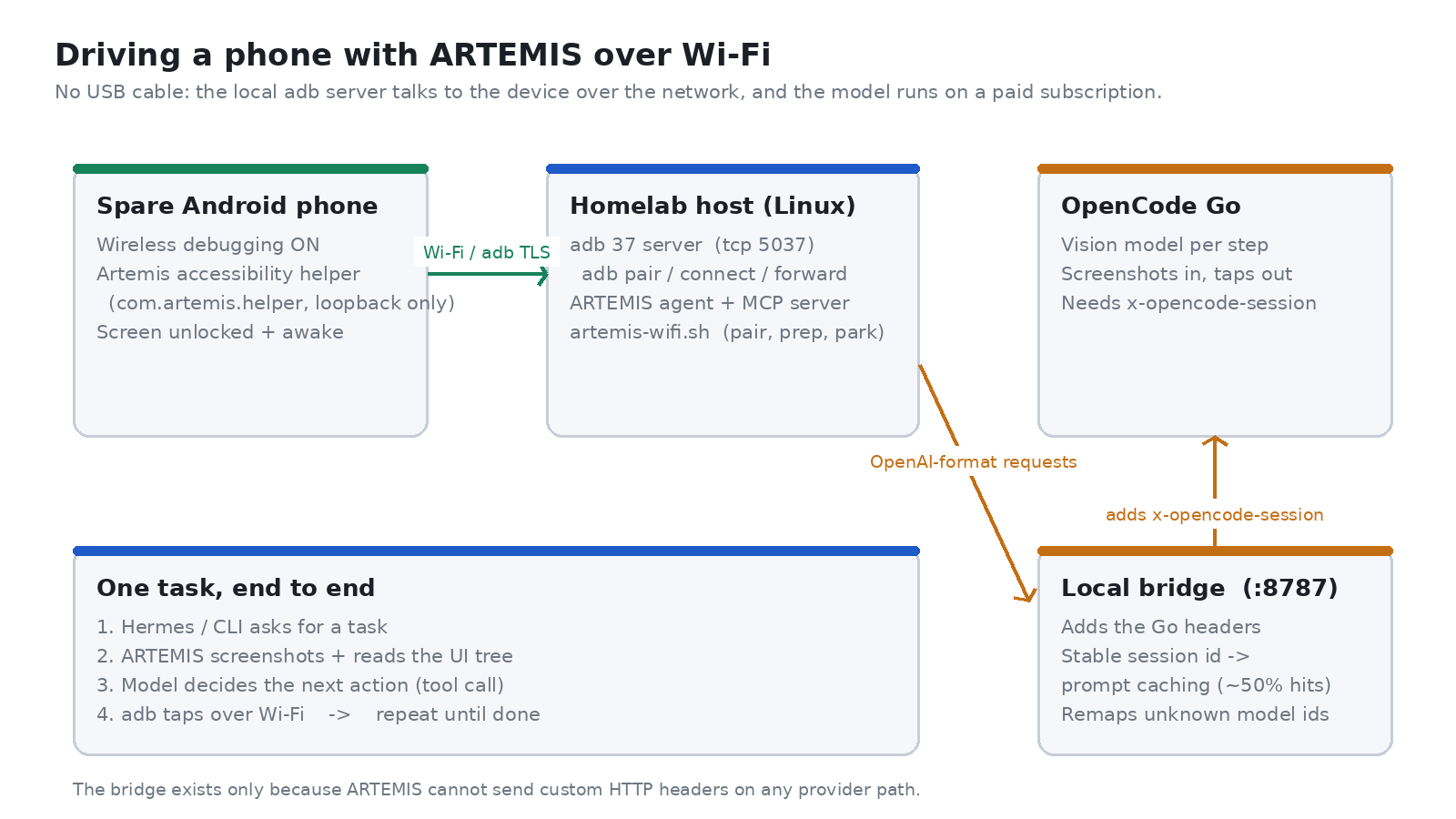
Here is the shape of the whole thing, because it explains every problem I ran into later. The phone never talks to the internet and the model never talks to the phone: a local adb server on my homelab machine owns the connection to the device over Wi-Fi, ARTEMIS drives that server, and the model sits behind a small local bridge.
FIRST, IS IT EVEN POSSIBLE?
Before pairing anything, I wanted to know whether ARTEMIS had a hard USB requirement hidden somewhere in its code, or whether the cable was only a convenience. So I did what I usually do when I do not trust documentation: I read the source and then wrote tests against it.
The interesting parts are three layers deep. Device enumeration runs adb devices -l and takes the first field of each line as the serial, with no filter on transport type. The device driver talks to the local adb server through adbutils, using AdbClient.device(serial=...), which does not care whether that serial is a USB device or a 192.168.0.x:5555 endpoint. And the submission gate that decides whether a task is allowed to run only checks two things: that the device state is device, and that its screen is unlocked.
To confirm it, I wrote six tests against those real classes rather than trusting my reading, including the device pool parser, the adbutils layer, and the submission gate with a wireless serial:
$ ~/projects/artemis/.venv/bin/python -m pytest tests/unit/runtime/test_wireless_serial.py -v
tests/unit/runtime/test_wireless_serial.py::test_device_pool_keeps_wireless_serial_verbatim PASSED
tests/unit/runtime/test_wireless_serial.py::test_device_pool_mixes_wireless_and_usb_devices PASSED
tests/unit/runtime/test_wireless_serial.py::test_adbutils_accepts_colon_serial PASSED
tests/unit/runtime/test_wireless_serial.py::test_submission_gate_accepts_wireless_device PASSED
tests/unit/runtime/test_wireless_serial.py::test_submission_gate_can_target_wireless_among_usb PASSED
tests/unit/runtime/test_wireless_serial.py::test_wireless_connect_targets_the_local_adb_server PASSED
6 passed in 0.04s
Six tests is not a lot, but it changed the whole shape of the project. Instead of “maybe I can hack wireless support in”, the task became “ARTEMIS already supports it, I just need to get the device connected and keep it connected”. Also worth noting: ARTEMIS ships an adb connect host:port path in its own web console, so the transport was never really the questionable part. The questionable parts came later.
PAIRING OVER WI-FI (AND THE SERIAL THAT IS NOT AN IP)
Pairing itself is a normal Android 11+ wireless debugging flow. On the phone you enable Developer options, turn on Wireless debugging, and open “Pair device with pairing code”. On the host you run adb pair with the pairing port and the six-digit code, and that is the only time you ever need to look at that screen:
$ adb mdns services
adb-XXXXXXX-XXXXXX   _adb-tls-pairing._tcp   192.168.0.x:37419
adb-XXXXXXX-XXXXXX   _adb-tls-connect._tcp   192.168.0.x:40095

$ adb pair 192.168.0.x:37419 864800
Successfully paired to 192.168.0.x:37419 [guid=adb-XXXXXXX-XXXXXX]
Here is the first surprise, and it is a real one: with modern adb, the device does not show up as ip:port. It shows up with its mDNS service name as the serial:
$ adb devices -l
List of devices attached
adb-XXXXXXX-XXXXXX._adb-tls-connect._tcp   device  product:sweet_global model:M2101K6G device:sweet
That is what you have to pass to -s or to ARTEMIS’s device_serial parameter, and it is also why a naive adb connect ip:port is a bad idea once pairing is done: you end up with two transports for one physical device, and any tool that enumerates devices will now see two candidates for the same phone. I mention this because it cost me a confusing ten minutes of “why does it say 192.168.0.x:5555 is refusing connections” while the phone was already connected and working perfectly under a different name.
The other thing worth knowing is that adb mdns services prints three columns separated by tabs, and if you write a little parser that reads two columns (as I did), it silently matches nothing and you conclude the phone is not advertising. That was my bug, not adb’s, but it is exactly the kind of thing that makes you think a feature does not exist.
THE FOUR THINGS THAT BROKE
Getting connected took about two minutes. Getting a task to actually run took the rest of the evening, and every blocker was in a different layer.
1. ARTEMIS hardcodes Gemini in three internal helpers. This is the big one. ARTEMIS lets you configure a provider per agent node, which sounds like it is model agnostic, and it mostly is. But the visual step summarizer, the memory capsule chunker and the image processor all call get_google_llm() directly, with no provider parameter. If you have no Google API key, they do not degrade gracefully: they raise API key required for Gemini Developer API during construction, before the agent has taken a single step, and the run dies immediately with a message that looks like an authentication problem rather than a design one.
The fix was one guard at the single chokepoint all three go through, about 24 lines: if no Google credentials are configured and an OpenAI-compatible endpoint is, build that endpoint instead. When a real Gemini key is present, the function behaves exactly as before.
def get_google_llm(model_name="gemini-3.8-flash", **kwargs):
    # The internal helpers (step summarizer, memory chunker, image processor)
    # call this unconditionally. If there is no Google key but an
    # OpenAI-compatible endpoint is configured, route there instead of
    # failing at construction. No-op whenever a Gemini key exists.
    _has_google = bool(os.environ.get("GOOGLE_API_KEY") or os.environ.get("GEMINI_API_KEY"))
    if not _has_google and os.environ.get("OPENAI_BASE_URL"):
        return ModelFactory.create_model(ModelEndpoint(
            provider=ModelProvider.OPENAI,
            model_name=os.environ.get("ARTEMIS_HELPER_MODEL", DEFAULT_VISION_MODEL),
        ))
    return ModelFactory.create_model(ModelEndpoint(provider=ModelProvider.GOOGLE, model_name=model_name))
I also had to add a missing import os to that module, which is a good reminder that “one line patch” is rarely one line.
2. A model without a provider quietly means Gemini. ARTEMIS’s config is a JSON file describing each agent node, and nodes look like this:
"entity_extractor": { "model": "gemini-3.5-flash-lite" }
There is no provider key, so it falls back to the default, which is Google. That is fine until the day you switch the default to something else, at which point this node keeps pointing at a Gemini model name that no longer exists on your endpoint. Worse, flash.step_summarizer in the config schema has a model field and no provider field at all, so you cannot fix that one from configuration even if you want to: it is Gemini-only by construction. My config generator now walks the tree, converts every model name, and adds an explicit provider to every node that names a model, including the four that had none.
3. The trace folder that looks empty. After my first successful run I went looking for the replay artifacts and found traces/<session>_PASS_*/steps/ full of empty folders and a steps.json containing [], while the log cheerfully said “DataEngine shutdown complete. All data persisted.” That reads like a broken run. The data was fine: it lives in traces/data_engine.db (a SQLite database with sessions, steps, traces and history_chunks tables) plus content-addressed JPEGs in traces/images/. That first run was 1 session, 22 step rows, 257 trace rows and 26 screenshots, all intact. The per-session folder is a shell in standalone mode, and if I had trusted it I would have “fixed” something that was never broken.
4. The phone drops off the bus. During the model comparison I describe below, ARTEMIS died with DeviceOfflineError: Device ... is not available (adb does not list it). Wireless transports do that: the phone idles, the network shifts, and the transport goes away even though the phone is still on Wi-Fi and still advertising over mDNS. The recovery is one command (adb connect to whatever adb mdns services reports), but the lesson is that anything built on wireless adb needs to expect this and reconnect rather than assume a stable transport. I now have a systemd unit that reconnects remembered endpoints every 30 seconds, and my test harness rediscovers the serial before every run instead of hardcoding it.
RUNNING IT ON A SUBSCRIPTION I ALREADY PAY FOR
ARTEMIS’s agent loop needs a multimodal model, because every step is a screenshot. The default configuration points at Gemini, and I did not want to open a second API bill for a spare phone. I already pay for an OpenCode Go subscription, and it includes a vision model, so I put a small local bridge in front of it:
ARTEMIS ──OpenAI protocol──▶ 127.0.0.1:8787 ──+Go headers──▶ opencode.ai/zen/go/v1
The bridge exists for one reason: the Go endpoint requires an x-opencode-session routing header and a client user-agent, and ARTEMIS has no way to send custom headers on any provider path. So the shim accepts the OpenAI-shaped requests ARTEMIS makes, injects those two headers, and forwards them. It also keeps a stable session id, which turned out to matter more than I expected: it enables prompt caching on the provider side, and in my runs about half the prompt tokens came back as cache hits, at a fraction of the price.
Two honest notes here. One, this is my own paid subscription being used for a workload it was not designed for, so if you copy this, check your provider’s terms first. Two, the model names in ARTEMIS’s config still say gemini-* in a lot of places, so my config generator rewrites them to real model ids, and the bridge defensively remaps anything it does not recognize.
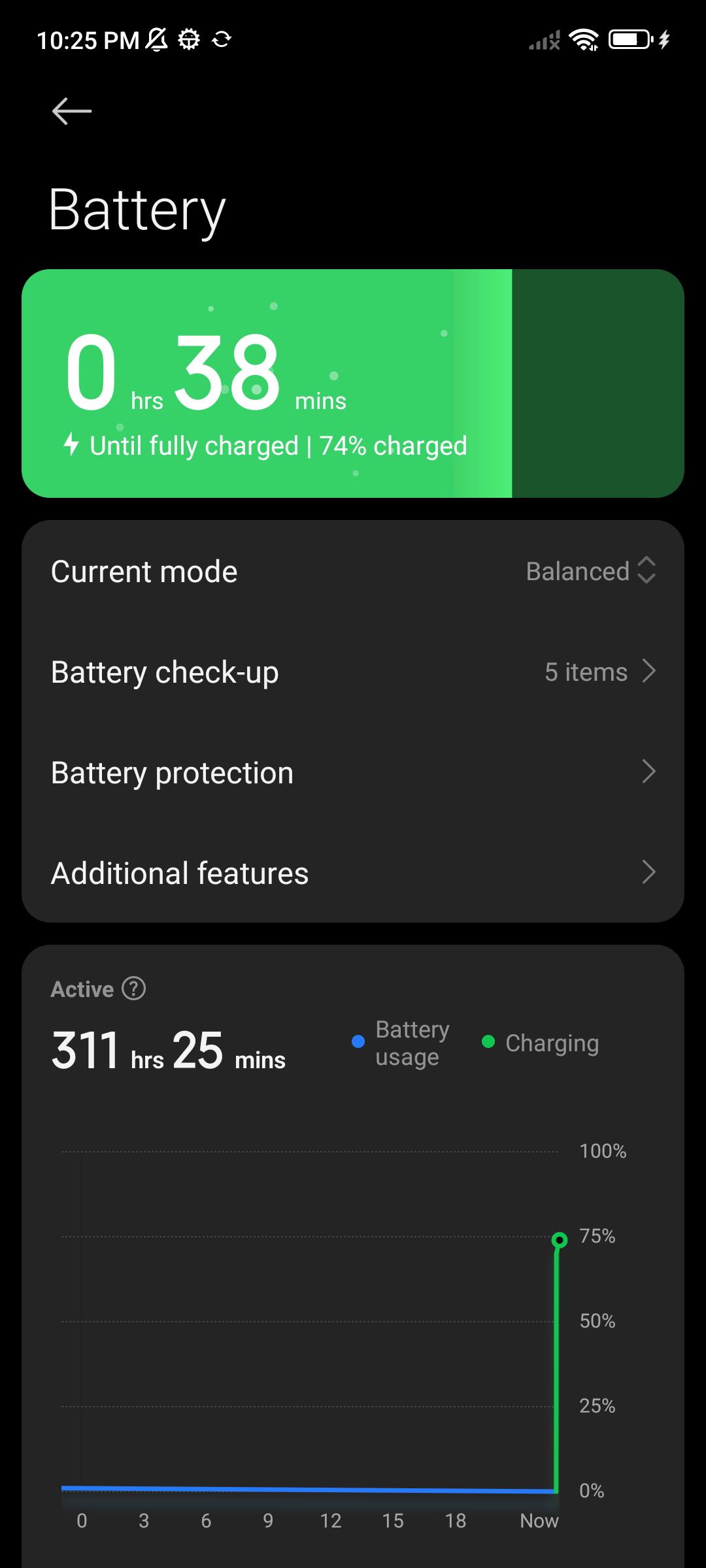
With the bridge running, the first real task was unremarkable in the best way: “Open the Settings app, go to Battery, and tell me the current battery percentage”. It did it in four steps and told me 74%, and I checked the phone myself because I do not trust an agent’s self-report:
THE PART WHERE MY OWN TEST LIED TO ME
This is my favourite mistake of the project, and it is the reason I wrote this post.
To choose a vision model, I built a shootout: generate synthetic phone-sized screens with a known button in a known place, ask each model where that button is, and check whether the answer lands inside the button. Clean, objective, hard to fool. The first version asked for coordinates in image pixels. The fixture is not complicated on purpose, so that a failure means the model cannot see, not that the test was hard:
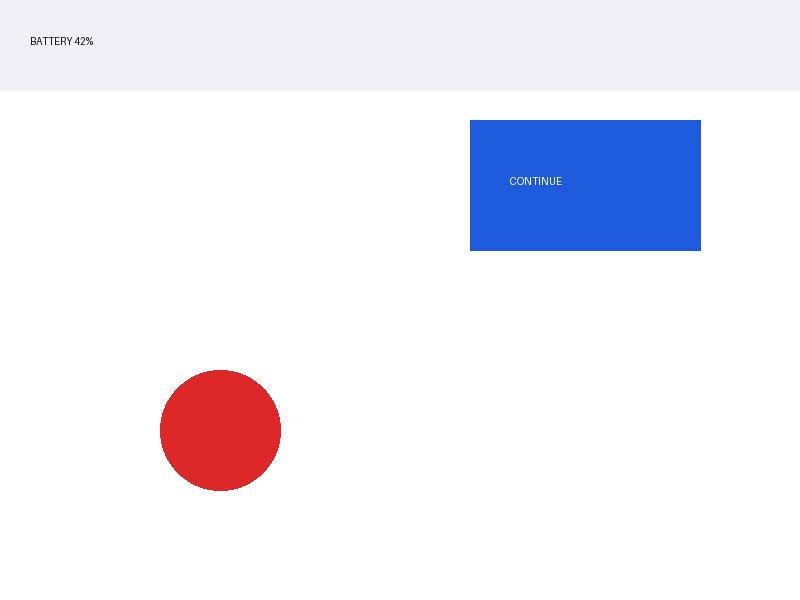
Every model missed. Not narrowly, either: errors of 450 to 1250 pixels, with hit rates of zero out of four across the board, including for a model that had just hit a target one pixel off centre on a smaller test image and had driven 22 real taps on a physical phone. My first instinct was that all the models were bad at spatial grounding. My second instinct, fortunately, was that when every candidate fails the same way, the instrument is the suspect.
It was the instrument. Providers downscale large images before the model sees them, so the model answers in its coordinate space, not the one I was checking against. The measured scale factor was around 0.82x, which is why the misses were large and consistent rather than random. Asking one model for normalised coordinates instead of pixels turned the same task into a pass.
The lesson is not “be careful with coordinates”. It is that a test that produces a dramatic result deserves a second look at the harness before it goes into a decision, and that “all candidates are bad” is usually a statement about the measurement. If I had trusted version one, I would have concluded that none of these models can drive a phone, which is not true, and I would have been wrong in a way that looked like data.
THE COMPARISON, WITH NUMBERS
Once the test was honest, I ran a real comparison with two parts: synthetic grounding accuracy, and then two real device runs of the identical task under identical conditions (app force-stopped, home screen, same prompt). The synthetic part:
| Model | OCR | Tap hits | Mean error | Latency |
|---|---|---|---|---|
| deepseek-v4-flash-vision-exp | 4/4 | 2/4 | 212 px | 2.31 s |
| glm-5.3-flash | 4/4 | 4/4 | 26 px | 2.19 s |
| mimo-v2.5 | 4/4 | 4/4 | 39 px | 32.7 s |
| qwen3.8-flash | 4/4 | 3/4 | 216 px | 6.27 s |
| muse-spark-1.3-contributor | – | – | – | HTTP 500, 8 of 8 calls |
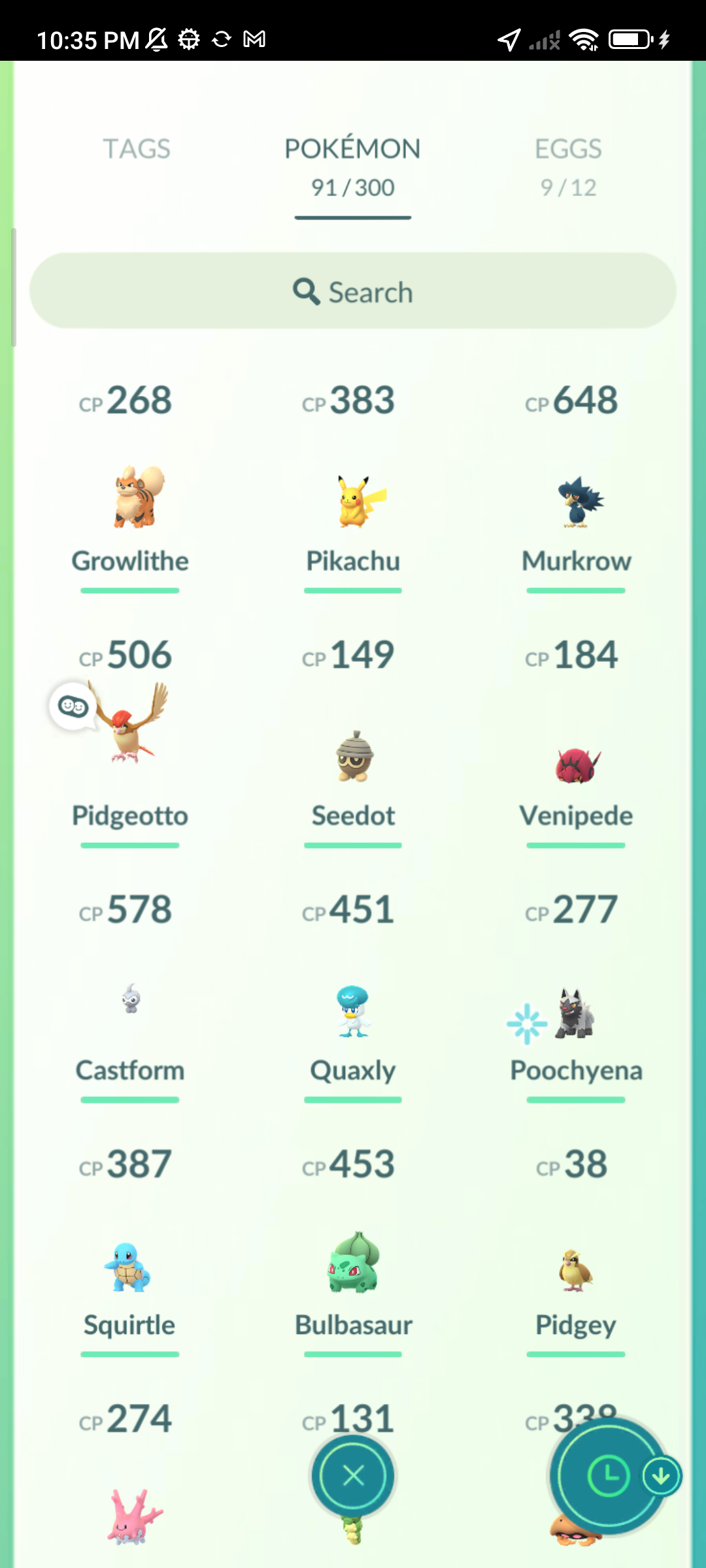
And the two real runs of “open Pokemon GO and tell me the most recently caught Pokemon”, which is a nicer test than it sounds because it requires launching an app, dismissing whatever popups appear, navigating a menu, interpreting a grid, and reading the right cell:
| glm-5.3-flash | deepseek-v4-flash-vision-exp | |
|---|---|---|
| Wall clock | 102 s | 100 s |
| Steps | 11 | 10 |
| LLM calls | 21 | 19 |
| Prompt tokens | 150,841 | 135,836 |
| Cache hit ratio | 55.7% | 56.6% |
| Cost | $0.0153 | $0.0120 |
| Answer | correct | correct |
Two conclusions. First, the synthetic grounding advantage did not translate: a two-second and one-step difference is noise, and both models solved the task. The reason is architectural. ARTEMIS mostly taps elements by their index in the accessibility hierarchy, not by vision coordinates, so coordinate accuracy is a fallback that decides whether a model is safe to use, not whether it is fast. Choosing between two models on that axis alone would have been a mistake.
Second, cost per run turned out to be less interesting than the monthly cap. GLM is about 27% more expensive per run, because its cached-read price is ten times higher, which eats most of the caching benefit. But its monthly allowance is four times larger, which means roughly 3900 runs a month instead of 1250. I switched to GLM for that reason and not for the accuracy. A 30-step task costs about three and a half cents, so a screenshot-heavy agent loop is much cheaper than I assumed going in, and my first measurement of $0.035 per run was inflated because the run also had to push a Play Store update for the game.
WHAT AN UNATTENDED DEVICE ACTUALLY NEEDS
One thing I did not expect: ARTEMIS refuses to submit a task to a locked device, and that is deliberate, not a bug. Its readiness gate checks the keyguard state and fails closed. For a phone sitting on a shelf that means the screen has to stay unlocked and awake, so I added a small prep script that disables the lock screen for the session and raises the screen timeout, plus a matching script to put it back to normal when I am done testing.
There is a subtlety here that bit me twice. ARTEMIS re-asserts svc power stayon usb at the start of every run, which only keeps the screen awake on USB power. My spare phone is on an AC charger, so that setting does nothing, and ARTEMIS falls back to a five-second host heartbeat to keep the display alive. It works, but if you are planning an unattended setup, that is the difference between a phone that is ready and one that is asleep when you ask it to do something.
WHAT I WOULD TELL SOMEONE STARTING THIS
If you have a spare Android device and you want to try ARTEMIS without a cable, the order that worked for me is: read the code before you trust the README (a few tests against the real classes will tell you more than any documentation), pair once and accept that the serial will look strange, expect to patch something if you are not using Gemini, and make the transport self-healing from day one because wireless adb will drop eventually.
And when you build a test to compare models, or tools, or anything: be suspicious when every candidate fails. Check the instrument before you write the conclusion.
One last note on how this was made, because I would rather say it than have someone wonder: I drove this with an AI agent doing a lot of the legwork, while I decided what to test and verified every claim myself along the way. That is the reason this post has four failed attempts and a wrong conclusion in it instead of a clean story, and honestly I think that makes it a better read than if I had hidden them.
For the technical setup itself, the whole thing is a handful of shell scripts, a config generator, a 60-line bridge and one patched function, and all of it is in my fork of ARTEMIS, antoniosolismz/artemis-wireless-hermes-agent, so the links in this post point at working code rather than a screenshot. The phone is currently unplugged, parked and waiting for its next task, which is more than it has done in years.